5.0★
EVERY RATING FIVE STARS
Install enough add-ons and Blender's N-Panel overflows into a sideways strip you scroll and squint through. Simple N-Panel gives it an index — press one hotkey (or click the heart in the viewport header) and a tidy menu lists every tab. Pick one and you're there. Built for artists whose add-on collection outgrew the tab strip — hard-surface, archviz, and production artists, and anyone tired of reading tab names sideways.
 // simple-n-panel.heart
The sidebar hosts every tool you own. Simple N-Panel is the index Blender never gave it.
It's a lightweight, $10 Blender 4.2+ extension that fixes one thing well: finding the right sidebar tab. Install a handful of add-ons and the N-Panel sprouts a stack of vertical tabs — too many to scan, their names long, clipped, and printed on their side. The more tools you own, the worse it reads.
Chipp Walters has been fighting this tab strip since 2021, when he shipped a free add-on called Simple Tabs to organize the N-Panel; its BlenderArtists thread has drawn over 26,000 views, and people were still posting in it five years later. Simple N-Panel is the modern answer — rebuilt from scratch as a Blender 4.2+ extension, current through Blender 5.0.
// it stays small and quiet on purpose
// see it in motion — one hotkey, every tab
Or click the ♥ heart button in the 3D Viewport header. A pop-up menu lists every N-Panel tab — add-on and built-in — sorted A–Z until you say otherwise.
The sidebar opens if it was hidden and switches straight to that category — in the viewport you clicked in, not just the first one.
Reorder with move-up / move-down / move-to-top, rename any tab with an alias (the real category name still does the switching, so renaming never breaks navigation), and hide the tabs you never use.
Install a new add-on, hit Refresh — its tab joins the menu at the bottom of your saved order, customizations untouched. Reset rebuilds from scratch only when you ask.
Export the whole layout — order, names, visibility — to one JSON file; import it on another machine or hand it to a team or classroom. Import reports exactly what came in and what was skipped.
Simple N-Panel doesn't add modeling or rendering features — it makes every tool you already own faster to get to.
Click the heart in the viewport header and a menu lists every N-Panel tab in your order; pick one and the sidebar opens straight to it. Shift-click the heart to toggle the sidebar instead.
The same menu from the keyboard — one memorable keystroke instead of scanning an overflowing strip. Collides with your keymap? Change it in Blender's keymap preferences.
Tabs list in clean A–Z order out of the box, so a long list stays scannable with zero setup.
Move-up, move-down, and move-to-top controls push your most-used add-ons to the front of the menu.
Give any tab a shorter display name. Names are aliases only — the real category is used under the hood, so renaming never breaks the jump.
Export order, names, and visibility to one JSON file and import it anywhere. Import tells you exactly what was imported and what was skipped.
Refresh folds in tabs from newly installed add-ons while keeping your setup. Reset rebuilds from scratch only when you ask.
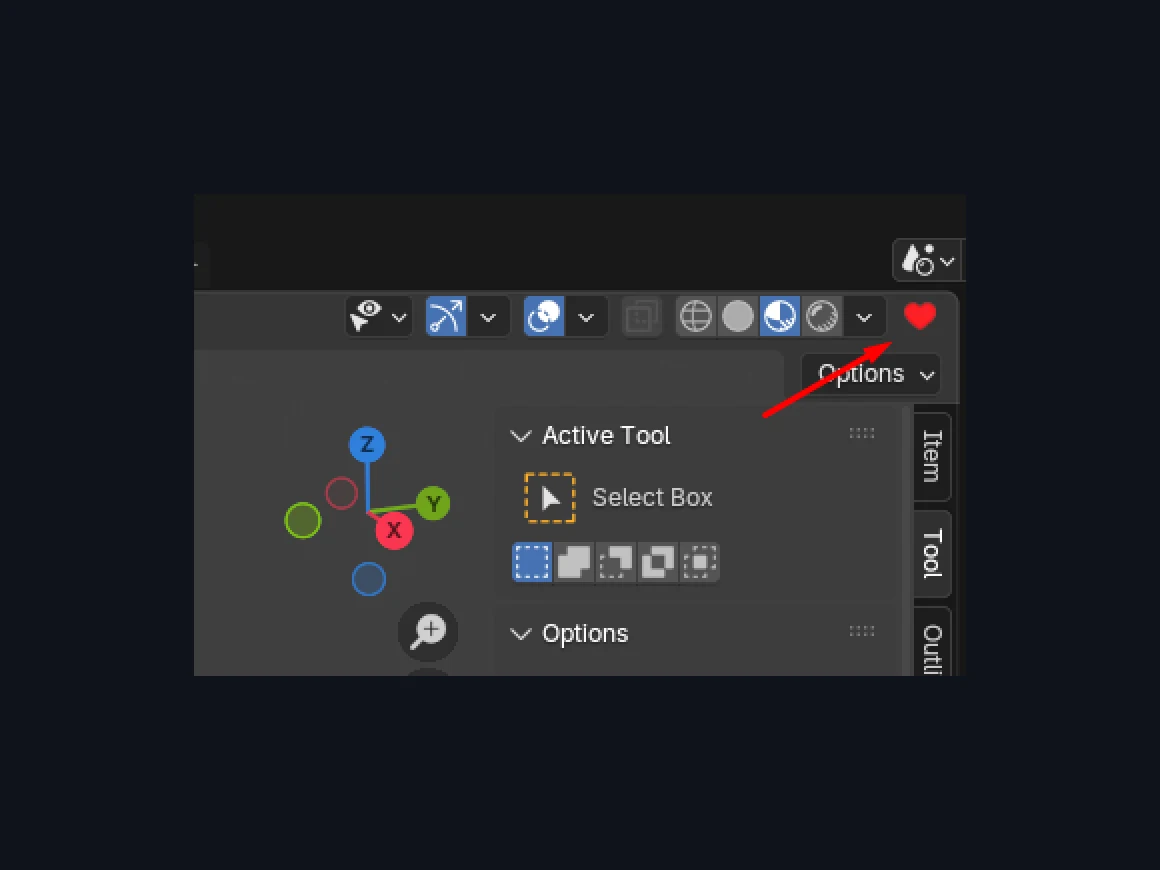 // the heart button — top of every 3D viewport
The heart lives in the 3D Viewport header — always one click away. It opens the menu; Shift-click toggles the N-Panel itself. Prefer the keyboard? Shift + ` opens the very same menu, and everything acts on the viewport you're actually working in.
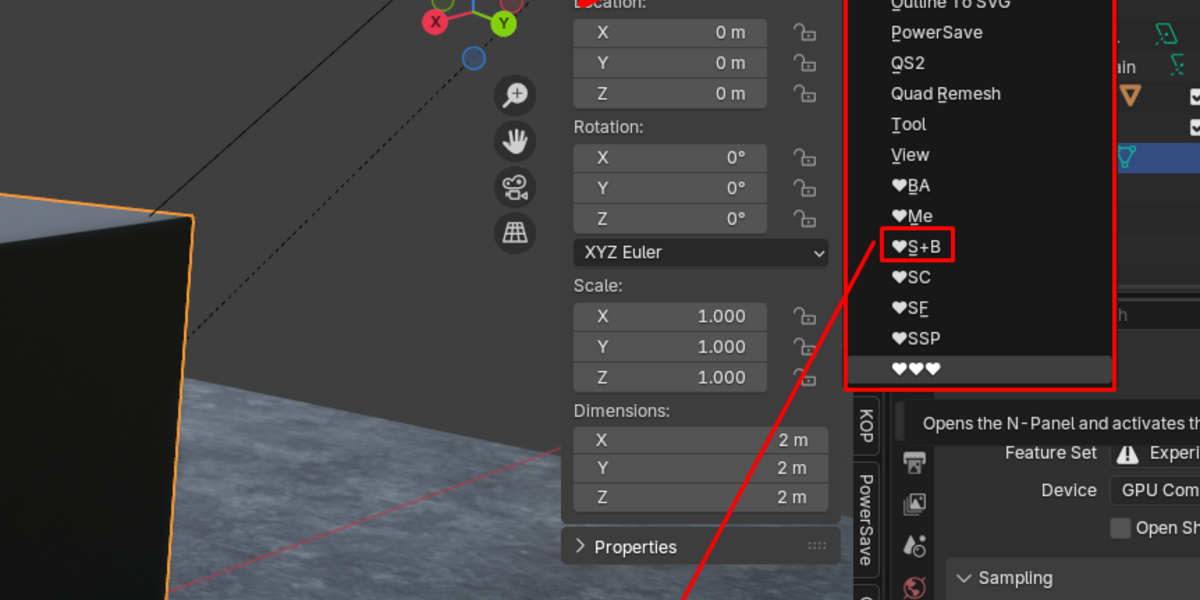 // the menu — a–z until you say otherwise
This is the whole trick: one pop-up, every tab, in your order. No scrolling a sideways strip, no hunting. Pick the tab and the sidebar snaps to it.
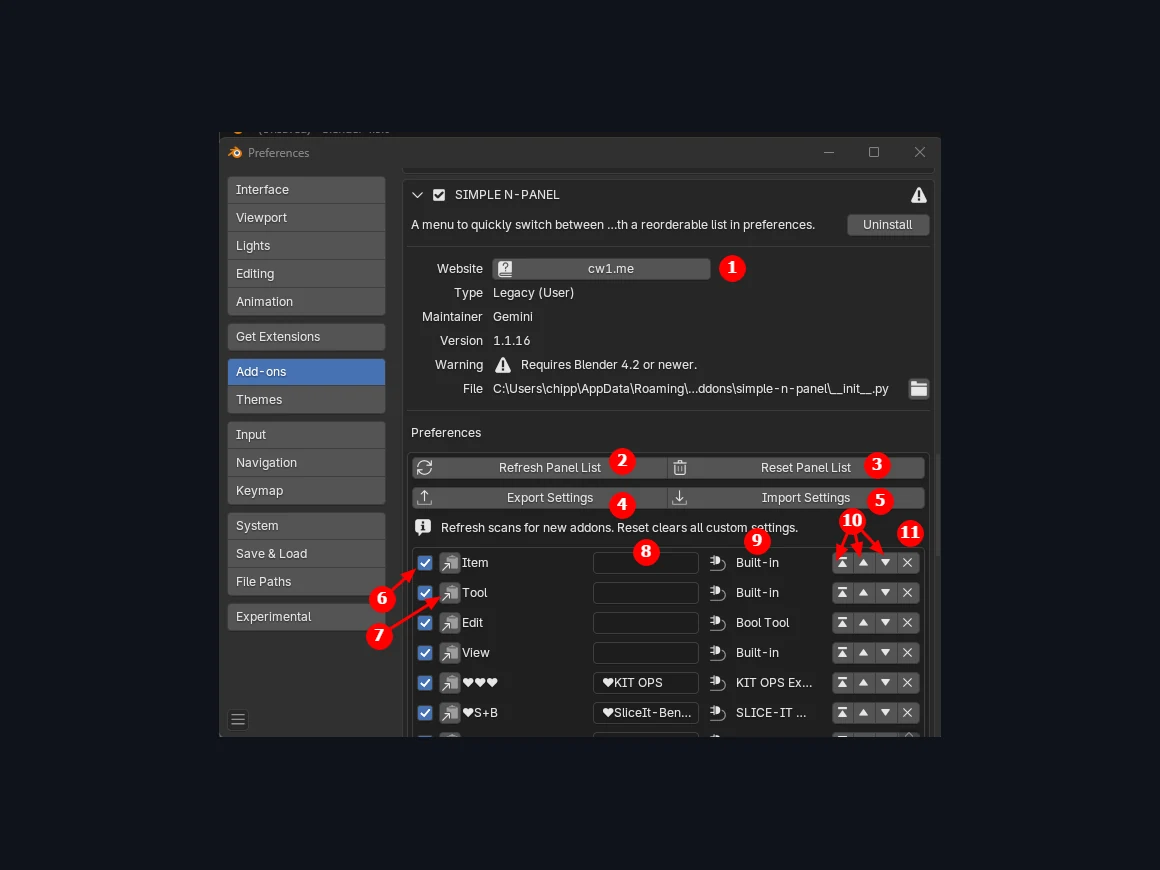 // preferences — reorder, rename, hide, export
The preferences screen is a single reorderable list: visibility toggles, custom-name fields, and move controls per tab, with Refresh, Reset, Export, and Import one click away. Changes save to user preferences immediately, so your layout survives restarts.
“The new addon by Chipp Walters, Simple N-Panel, is the answer to a frustration that I have had about Blender for a long time. This makes a crowded N-panel usable. Amazing!”
“An ingenious solution to the problem Chipp! I like it a lot.”
“boggles my mind they haven't integrated this natively yet.”
“One thing that has been annoying since I started using Blender has actually been that the N-Panel's text is vertical. This add-on is perfect in its simplicity.”
“Simple, functional, and super easy to use. Should be installed by default in Blender.”
“Works right out of the 'box' with zero fuss. Automatically sorts the list too.”
“Chipp was extremely helpful with troubleshooting errors that came down to my strange install and user error. Buy with confidence.”
$10, one-time purchase. It's the quiet utility that makes every other tool in your sidebar easier to reach.
If another add-on already uses it, reassign the shortcut in Blender's keymap preferences. The heart button in the viewport header works mouse-only, no hotkey needed.
Hit Refresh Panel List (in preferences, or at the bottom of the menu itself). New tabs join at the bottom of your saved order; your customizations stay put.
No. Display names are aliases only — the real category name still does the switching underneath.
Not today. Hide, rename, reorder, and move-to-top are the tools for taming a long list.
A known timing quirk on slower machines: Blender is still opening the sidebar when the tab switch fires. Fix: keep the N-Panel open in your startup file, or tap N once before first use. After that it behaves.
Simple Tabs was Chipp's free 2021 take on this problem. Simple N-Panel is the modern rebuild — a proper Blender 4.2+ extension, current through Blender 5.0.
Customers keep saying so, and we'd take that as a compliment. Until then, Simple N-Panel fixes it today — built by a Blender Dev Fund contributor who'd be glad to see the problem disappear.
Simple N-Panel is a $10, one-time purchase. No dependencies, no network, no scene data — it only reads which panels are registered and stores a small list in your preferences.
The quiet utility with a perfect record — and a catalog behind it that answers. Backed by first-class support for Blender customers since 2019: an active Discord where a human replies.
One hotkey replaces the overflowing tab strip. Simple N-Panel is small, local, and built for the way Blender artists already work.